


Fanytel - Virtual Phone Number
3.5343.00 Reviews
App Specs
- Version
- 1.4.3
- Updated On
- License
- Free
- Downloads
- 5,000,000+
- Developer
- Zeust Ltd.
- Categories
- Communication
- Platform
- Android, iOS
Screenshots
 Analysis by AppCompare
I approach a second-number app less as a replacement for my regular phone service and more as a way to create a separate boundary. That distinction matters with Fanytel: it may suit someone who wants a distinct number for certain conversations, but it is not automatically the right answer for every call, text, or account verification. I’d decide first what I want the extra number to do, then check whether the app’s current options fit that job.
What a second number changes in everyday use
The most useful reason to keep a separate number is often not complicated: it lets me avoid giving out my primary number in situations where I expect follow-up calls or messages. A small business owner might put the second number on a listing, while someone selling a used item could use it for buyer contact. In either case, the practical benefit is separation, not anonymity. I would still be careful about what personal details I share in a conversation.
That separation works best when I set a clear purpose for the number before using it. For example, I might reserve it for customer enquiries and leave family, banking, and personal contacts on my usual line. If messages arrive at both numbers, that boundary can make it easier to recognize what needs attention. The trade-off is that I have another inbox and another number to manage, so this is less appealing if I already struggle to keep up with messages.
Calls, texts, and verification are different jobs
A second number can be useful for ordinary calling and texting, but I would not assume that every online service will accept it for verification. Verification systems can treat virtual numbers differently, and acceptance may depend on the service asking for the code. If a particular account is important, I would not make a virtual number its only recovery route unless I have confirmed that it works and have another reliable way back in.
For casual sign-ups, separating messages from a personal line may be convenient, but it does not make a temporary number a risk-free choice. Accounts tied to a number can be difficult to recover if access to that number changes. I’d use a number I expect to keep for anything important, and I’d review account recovery settings before relying on it for work or long-term services.
How I would judge performance in real conditions
Phone-app responsiveness and call performance are not quite the same thing. A screen can feel quick while a call still depends on network conditions and the other person’s connection. I would test the kind of call I actually need to make—such as a short call to a regular contact—before using a second number for a time-sensitive client conversation. A brief trial is more informative than assuming that a good first impression guarantees every call will sound the same.
Heavy use also changes the experience. If I’m juggling calls, incoming texts, and notifications while switching between work and personal conversations, the main challenge may be attention rather than speed: I need to notice which number is active and reply from the right one. Keeping contacts and conversation purposes distinct can reduce mix-ups. I would avoid using two numbers interchangeably with the same person unless there is a clear reason, because that can make the history harder to follow.
Worth Reading Before You Choose

EA SPORTS FC Mobile 26 Is a Bigger Football Game, but It Takes Time

Flipboard Shows What News Apps Must Do Beyond the Feed

Switching to Android Auto Means Rethinking Your Driving Routine

Google Calendar Makes a Crowded Week Easier to Manage

Ludo King Makes the Most of the Minutes Between Plans

Baby Panda World Brings Quick Play to Modern Phones, but Its Game Library Feels Busy
Who is likely to find it worthwhile
I can see the appeal for a freelancer who wants a separate contact line, a traveler who needs another calling option, or someone who wants to keep a public-facing number apart from their personal one. It is also useful to think about the people on the other end: if clients expect replies during business hours, I would set a realistic routine for checking the second line rather than assuming a separate number will organize itself.
On the other hand, I would skip this kind of app if I need a guaranteed substitute for a carrier line, depend on a number for emergency or account recovery access, or want to avoid managing another communication channel. Someone who only needs to silence unknown callers may be better served by the controls already on their phone. A person who needs a stable business telephone setup with predictable availability may prefer a dedicated service designed around that requirement.
Cost, expectations, and a sensible first test
Fanytel is a free communication app from Zeust Ltd., with optional in-app purchases priced from $1.99 to $24.99 per item. I would treat “free” as the cost of getting started, not as a promise that every number or use case will be included without payment. Before building a routine around it, I’d check the choices shown in the app and make sure the purchase terms suit how long I expect to use the number.
The app is rated for Everyone and has an average rating of 2.9 from around 9,200 ratings, with over 5 million installs. Those figures suggest it has reached a broad audience, but the rating is a reason to approach it with measured expectations rather than assume a flawless experience. I’d pay attention to whether the functions I need work consistently for my own contacts and network, not treat popularity as proof of reliability.
Choose the right tool for the job
Compared with using a second SIM or eSIM, an app-based number can be easier to manage without changing the way my device handles physical lines, while a carrier-provided line may be a better fit when I need conventional mobile service and broad compatibility. Compared with a messaging app, a second-number app is more relevant when I need a phone-number-based point of contact; a messaging account is often simpler if everyone I need to reach already uses the same service.
There is no universal winner among these options. I’d choose based on whether I need calls, texts, account compatibility, or a clean boundary between kinds of contact. If the key requirement is dependable access to a number over time, I would prioritize continuity and recovery over convenience. If the goal is simply to keep a one-off conversation away from my personal line, a lighter option may be enough.
My practical recommendation
My first test would be deliberately small: pick one low-stakes use, make a call, send a text, and see how the replies arrive before sharing the number widely. I’d also check which number I’m using before each message, decide how I’ll keep track of important conversations, and avoid tying essential accounts to it until I’m confident that it suits my needs. That approach helps expose friction early without making the number part of a critical routine too soon.
There are also basic questions worth settling for yourself before relying on any second-number service: will the people I need to reach accept calls or texts from it, can I keep using it for the period I need, and what is my backup if I lose access? Those are practical planning questions, not reasons to dismiss the app. Answering them first can prevent a convenient extra line from becoming a point of confusion later.
The current version is 1.4.2, and it supports Android 6.0 and later. That makes it an option for a range of Android devices, though an operating-system minimum does not guarantee identical performance across every handset. I would keep the app updated and judge it on my own phone, especially if I rely on notifications to catch calls or messages promptly.
For me, the best case for a virtual number is a clear, limited purpose: a separate contact route that makes privacy boundaries easier to maintain. The weakest case is expecting it to behave exactly like a primary carrier number in every situation. With that distinction in mind, I’d consider trying Fanytel for a non-critical second line, while keeping an established number for anything where uninterrupted access matters most.
If you've ever wanted a virtual phone number to keep your personal number private or to manage international calls without the hassle, the Fanytel app might just be your best friend. I gave it a whirl, and here's the lowdown on what I found.
First Impressions: Easy Peasy Setup
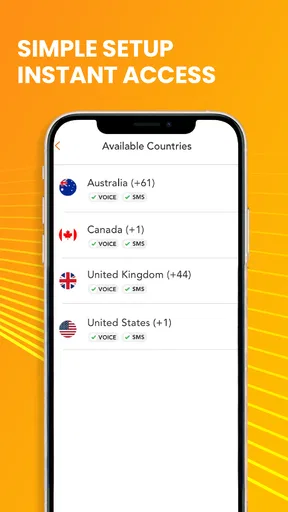
Getting started with Fanytel is a breeze. You download the app, sign up, and voilà—you’re ready to choose a number. The interface is clean and intuitive, which means you won't need to spend ages figuring out how it works. I was pleasantly surprised by the variety of numbers available from different countries. Whether you need a number from the US, UK, or even Australia, they've got you covered.
Features That Stand Out
One of the coolest features is the ability to make and receive calls globally. Being someone who frequently communicates with folks overseas, I found this incredibly useful. The call quality is surprisingly good, which is often a concern with virtual numbers. Plus, you can send and receive texts, so it's not all about the calls.
Another feature I loved is the voicemail transcription. This means no more jotting down notes during a voicemail. It’s all transcribed for you, which is a huge time-saver. And let’s not forget about the call recording option—perfect for those important meetings where you need to remember every detail.
Privacy and Security
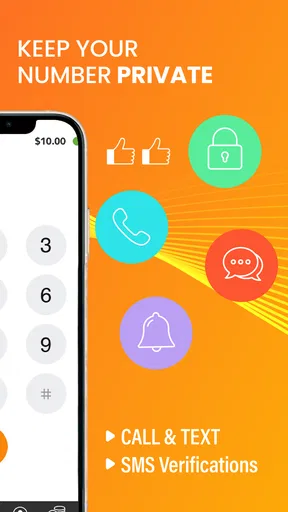
When it comes to privacy, Fanytel has your back. The app promises secure connections and doesn’t share your personal data, which is a big relief in today’s data-hungry world. You can also manage your numbers effectively, choosing which ones to make public and which to keep private.
User Experience: Smooth Sailing
Using Fanytel feels like a walk in the park. The app is smooth, with no noticeable lag or glitches during my time with it. Navigating through the settings and features is straightforward, and I didn’t encounter any crashes—always a plus.
An added bonus is the customer support. I had a couple of queries and reached out to their support team. They were quick to respond and very helpful, which definitely adds to the overall positive experience.
Pricing: Worth Every Penny?
Now, onto the topic of pricing. Fanytel offers various plans to suit different needs and budgets. While it's not the cheapest option out there, you get a lot of bang for your buck considering the range of features and the quality of service. There’s even a free trial, so you can test the waters before committing, which I found quite reassuring.
Final Thoughts
So, should you download Fanytel? If you’re in need of a reliable virtual phone number with great features and superb call quality, I'd say go for it. Whether it's for business or personal use, this app is a solid choice. It’s user-friendly, feature-rich, and, most importantly, it works seamlessly.
In a world where privacy and communication are key, having a tool like Fanytel is invaluable. Give it a try, and you might just wonder how you ever lived without it!
Pros
- Easy to set up and use interface.
- Affordable international call rates.
- Variety of numbers from different countries.
- Reliable call quality and stability.
- Supports both personal and business use.
Cons
- Limited free trial options available.
- Occasional app crashes reported.
- Customer support response can be slow.
- Some features require in-app purchases.
- May consume significant battery life.
FAQs for Fanytel - Virtual Phone Number
What is Fanytel and how does it work?
Fanytel is a virtual phone number app that allows users to obtain international phone numbers for various countries. It works by providing virtual numbers that can be used for calling, texting, and receiving calls without needing a physical SIM card. Users can manage multiple numbers from a single device, making it ideal for business or travel.
Is Fanytel secure and private?
Yes, Fanytel prioritizes user privacy and security. The app uses encryption to protect your calls and messages, ensuring that your communications remain private. Additionally, Fanytel does not store your call logs or message history on their servers, giving you peace of mind about your data's safety.
What are the costs associated with using Fanytel?
Fanytel offers various pricing plans depending on your needs. Users can choose from pay-as-you-go options or subscribe to monthly plans for more extensive use. While the app itself is free to download, charges apply for obtaining virtual numbers and using calling or messaging services. Always check the latest pricing on their website before purchasing.
Can I use Fanytel on multiple devices?
Yes, Fanytel allows you to use the app across multiple devices. You can manage your account and virtual numbers on both Android and iOS platforms, and you can synchronize your contacts and messages between devices to ensure seamless communication. This is especially useful for users who need flexibility and accessibility.
Does Fanytel support international calling and texting?
Fanytel supports international calling and texting, making it an excellent choice for users who need to communicate with people in different countries. With a variety of international numbers available, you can easily stay connected without incurring high roaming charges. It’s perfect for frequent travelers or international businesses.


